DUBBING & VOICES
Let each speaker have a voice.
Use speaker detection for conversations. Clone an original voice, upload or record an authorized reference, or choose a preset voice.
Open Studio
DUBBING · SUBTITLES · LIVE · VIDEO EDITING
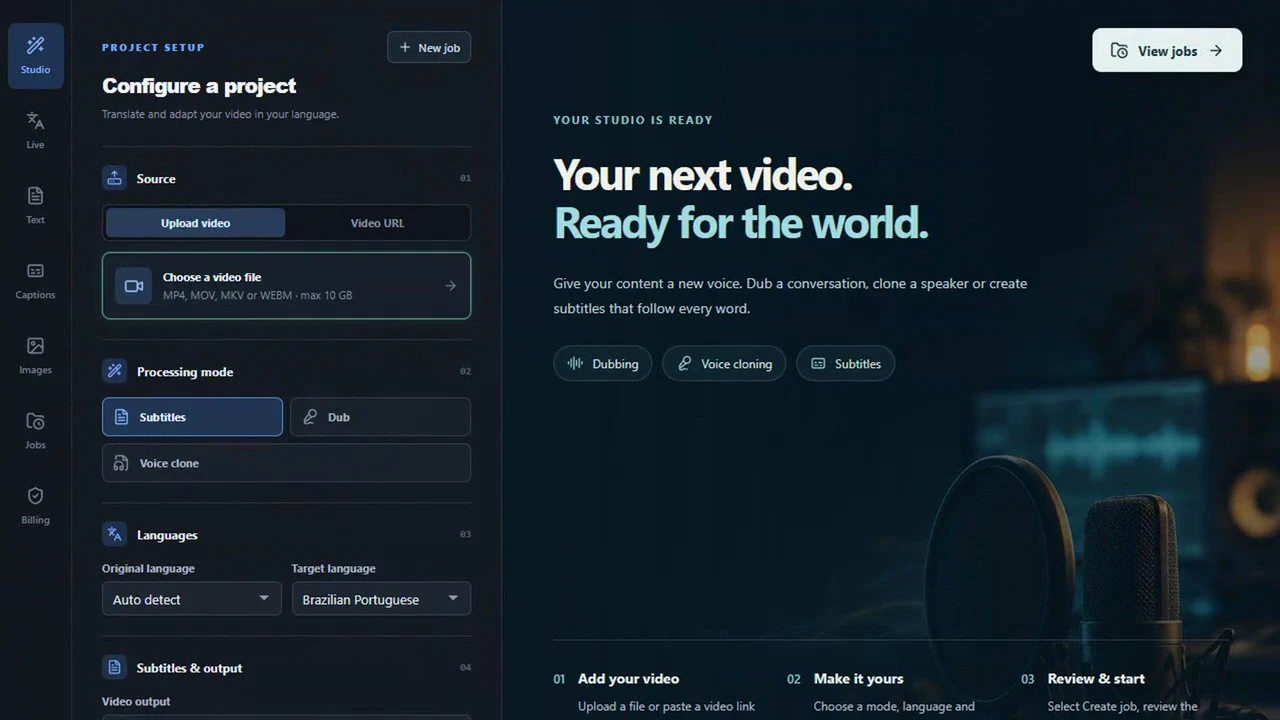
Edit your videos, translate dialogue, clone voices and create subtitles. With Live translation, follow lessons, conversations and stories in another language as they happen — all in one Studio.
Sign in to create a project. Review the price before paid processing.
Starter · USD 9.90 / monthONE STORY. MORE WAYS TO CONNECT.
Publish a lesson in another language, or understand an interview you've been meaning to watch. Start with the result you need.
YOUR CONTENT, WITH YOUR CHOICES
Choose the voice, the subtitles and the finish that fit your project.
DUBBING & VOICES
Use speaker detection for conversations. Clone an original voice, upload or record an authorized reference, or choose a preset voice.
Open StudioVoice and language support depends on the selected mode. Translated word timing may need review.
LIVE · REAL-TIME TRANSLATION
That podcast you want to follow. A call in English. A show from another country. Someone sitting beside you. Listen to a spoken translation and follow the text as the conversation happens — with a short delay.
Start with LiveOriginal · English
Great ideas can come from anywhere. Let's share them with the world.Translation · Portuguese
Boas ideias podem vir de qualquer lugar. Vamos compartilhá-las com o mundo.Share a browser tab's audio and follow the ideas in your language.
Listen to a browser call through supported tab audio sharing.
Follow an accessible broadcast, or use your microphone near a TV.
Let the microphone pick up someone speaking nearby.
Download the transcript and optionally record up to 30 minutes of translated audio. Keep the ideas, revisit the details and listen again at your own pace.
Saved transcripts and recordings stay in this browser. Download them to keep your own copy.
Tab audio depends on browser support and sharing permission. Live helps you listen; it does not send translated speech into telephone calls. Sessions: up to 60 minutes.
SUBTITLES THAT MOVE WITH YOUR MESSAGE
A good message deserves to be followed. Draw attention to the spoken word, reveal the sentence as it unfolds, or give a whole phrase emphasis. Choose your style in Studio.
Keep the full sentence visible. Let color guide the eye.
Reveal words as they are spoken. Highlight and underline the current word.
Bring the active phrase forward with bolder, larger text.
Illustrative style previews. Translated word timing is approximate; review before publishing.
ALREADY HAVE SUBTITLES? MEET CAPTIONS.
Your subtitles are ready. Why rebuild them? Open your SRT or VTT in Captions, translate the text, adjust the timing if needed and download your file. Give the work you already did a new audience.
Open CaptionsCaptions uses the separate Text / Captions / Images / Live balance.
WATCH THE STUDIO IN MOTION
A closer look at the real interface, with guided zooms from your video input to voices, subtitle styles and price review. Everything starts in your browser.
Start with an authorized file or a supported accessible link.
Choose your target language and the voice that fits the project.
Explore animated captions and choose how your message appears.
Review the project price before confirming paid processing.
Edited walkthrough of real Studio screens with demonstration data. No paid processing or output-quality demonstration is shown.
Upload an authorized video, or use a supported accessible URL. If a source site blocks the server, upload the file instead.
Select a language, voice mode and subtitles. Multiple speakers and voice references depend on your chosen processing mode.
Check the project quote before payment or credit use. Processing takes time: track its status, then download the available files.
Use Text for written content. Captions, Images and Live are separate tools with their own shared balance.
VIDEO EDITING INCLUDED
Turn your source video into the video you want to share. Cut distractions, get the framing right, add your identity and shape the sound — in the same Studio where you dub it. Fewer steps between your idea and your next audience.
No separate editing feeSEE THE EDITOR IN ACTION
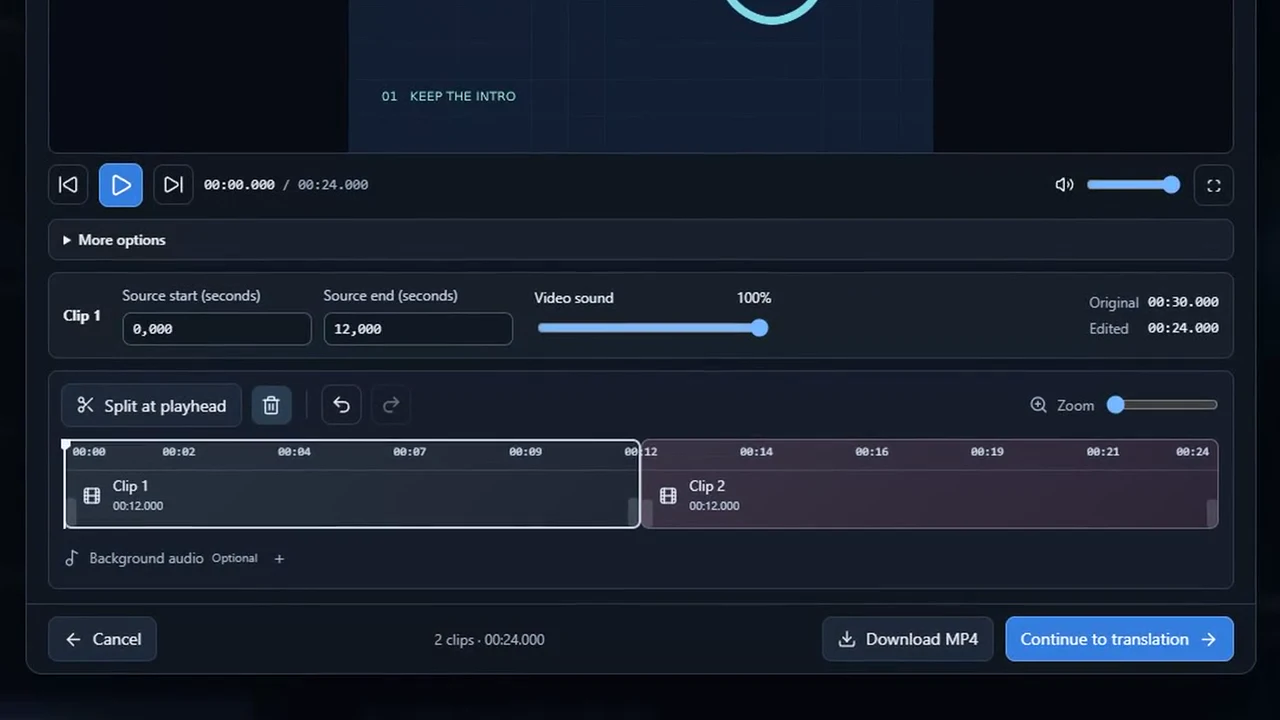
Watch the real controls up close. Keep the best parts, change the format, add your soundtrack and carry your edit into dubbing. Follow the full tour or jump straight to a step.
Recorded in the D-UB editor with demonstration video and audio.
You do not need to dub the entire source file. Trim the start and end, split at the playhead and remove anything you do not want to include. Only the clips you keep go forward for dubbing in the new version. Set times on the timeline or enter precise values, with zoom, undo and redo.
CUT · SPLIT · UNDOPrepare videos for Facebook, Instagram, YouTube and X. Choose 16:9 for landscape videos, 9:16 for Reels and Shorts, square 1:1 or portrait 4:5 — or keep the original. Crop the borders, show the whole image or fill the frame, leave space above or below and choose the background color.
CROP · FORMATS · FRAMINGAdd background audio to your video with a track you upload. Choose the music excerpt, when it starts and its volume, separately from the video's sound. Set video speed from 0.5× to 2× while preserving voice pitch. Your soundtrack choices stay with the video when you continue to dubbing.
SPEED · VOLUME · MUSICAdd text, images, a logo or watermark in up to eight layers. Set position, size, opacity and when each layer appears. Style text with fonts, colors, bold, alignment and a background box.
TEXT · IMAGES · WATERMARKChoose a cover and download it as a PNG. Add a 1–15 second opening with an image, a title or both. Give your video a recognizable introduction before the main content starts.
COVER · OPENING · TITLEPreview your edits, inspect the cut with playback controls and download the MP4. Or continue straight to translation with your editing choices, without starting over in another app.
PREVIEW · MP4 · DUBBINGProfessional editors such as Adobe Premiere have a separate subscription. Before adding another bill to your workflow, see what you can already do here. D-UB includes the editing tools above: your budget goes toward the translation, dubbing or AI subtitles you choose.
Adobe Premiere subscriptionOne project to start. Your creative choices stay with you.
Editing and MP4 download have no separate editing fee. An account and supported files are required. Translation, dubbing and AI subtitle generation show their own quote before paid processing.
SERIOUS COMPUTE. A SIMPLE WORKFLOW.
We use high-performance NVIDIA GPUs to accelerate AI processing for your videos. You focus on the story, the voice and the finishing touches; our cloud infrastructure brings the computing power to turn your choices into new versions, ready for you to review and share.
No dedicated GPU to buy. No models to install. Open Studio in your browser.
GPU selection depends on the mode, compatibility and availability. Additional catalog models require validation before use; processing time varies with your video, options and queue.
THE RIGHT TOOL FOR THE TASK
Video is just the beginning. Use a focused workspace for the content in front of you.
Translate, dub and caption authorized videos. Review your quote before processing.
Use a microphone, explicitly shared tab audio or supported audio/video files. Browser permissions and source restrictions apply.
Trim, reframe and add background audio, text and your brand. Download the MP4 or send only the clips you keep for dubbing. No separate editing fee.
Work from SRT or VTT captions while keeping their timecodes.
Translate written content and supported documents. Review the estimate before confirming.
Upload an image, extract and translate its text, then review the result.
Video credits and the Text / Captions / Images / Live balance are separate. A video plan does not fund every tool.
BUILT AROUND YOUR CONTENT
Dub your own lessons and add readable subtitles. Split longer courses into supported files.
Video + subtitlesTranslate a video you can legally upload and review its instructions at your own pace.
Video translationUse speaker detection and review each voice in a conversation.
Dubbing + speakersAdapt a video podcast with authorized voice references and captions.
Video + voice referencesTranslate internal videos you have permission to process and distribute.
Video + captionsMORE ROOM FOR YOUR NEXT PROJECT
Start with one video, without a required subscription. Publish often? Choose a monthly plan that gives you more video credit than its price — with the same Studio features in every plan.
Try your workflow with a single paid project. Decide about a plan when it fits your routine.
Review your project quote before confirming paid processing. Opening Studio does not start a paid job.
Choose a plan for its video credit. Voice and subtitle options depend on your mode, not an exclusive premium tier.
Pro plan · monthly catalog
Values in USD from the public catalog. Video credit is service credit, not cash or a refund. Payment currency and total appear at checkout.
No subscription required. The price depends on duration, service and target languages. Review the final amount in Studio before processing.
Starter
For occasional projects
USD 9.90/ month
USD 11.00Studio video credit / month
Same video capabilities in every plan
View plan in StudioCreator
For a regular publishing rhythm
USD 24.90/ month
USD 31.13Studio video credit / month
Same video capabilities in every plan
View plan in StudioPro
For a larger video library
USD 49.90/ month
USD 71.29Studio video credit / month
Same video capabilities in every plan
View plan in StudioCatalog prices and video credits are denominated in USD. Current checkout charges in BRL using the server's conversion; the payable amount and currency are shown before confirmation. No browser currency conversion is applied here.
Plans renew monthly. Plan changes take effect at renewal, without proration. Cancellation keeps the paid period and existing credit. Additional work needs enough credit or a separate payment.
| Capability | Pay per project | Starter / Creator / Pro |
|---|---|---|
| Video translation & subtitles | Paid project | Uses video credit |
| Dubbing & voice cloning | Selected mode | Same modes |
| Multiple speakers & voice references | Depends on mode | Depends on mode |
| SRT / styled VTT / captioned MP4 | Selected output | Same outputs |
| Upload / supported accessible URL | Source restrictions apply | Same restrictions |
| Subtitle styles / trim / logo | Selected options | Same options |
| Cover & opening customization | Available in Studio | Available in Studio |
| Language & duration limits | Depends on mode | Same limits |
| Support | Support page | Support page |
| Text / Captions / Images / Live | Separate balance | Separate balance |
| Lip-sync / public developer API | Not offered here | Not offered here |
| Monthly video credit | No monthly allowance | Allowance shown above |
Live uses a separate USD 0.28 / minute tariff for accepted audio, including silence. Cumulative usage is rounded up to the next cent. Maximum session: 60 minutes.
A LITTLE GUIDANCE GOES A LONG WAY
From an authorized source to voice choices, price confirmation and download.
Read the guideChoose a style, understand SRT and WebVTT, and review translated timing.
Read the guideChoose the source, check the estimate and use the separate tool balance.
Read the guideExisting guides open in English.
You can start with a video file and choose the language, voice and subtitles in Studio. The guided walkthrough shows the interface before you sign in. You do not need to install AI models or own a dedicated GPU.
You can pay for a single project without a monthly subscription. Review the quote for your video and decide before paid processing. If you begin publishing regularly, monthly plans add video credit without changing the available creative tools.
The Studio gives you voice choices and subtitle styles, but the result depends on the source audio, language and selected mode. Clear speech and a suitable authorized voice reference help. Review voices, translation and timing before publishing; no page preview guarantees your result.
Yes. You can download the original and translated transcript, and optionally record up to 30 minutes of translated audio. Saved content stays in this browser; download it before clearing browser data. Listen live now and revisit the details later.
No. Video projects can be paid individually after you review the quote. Monthly plans are optional and add Studio video credit. Opening the Studio does not start a paid job.
Yes, in supported dubbing modes. Use original-speaker cloning, an uploaded or recorded voice reference, or a preset voice. Speaker detection supports conversations. You must have permission to use the media and voices.
No. The available source and target languages depend on the tool and voice mode. Check the Studio selection for your specific project. The six languages of this website are not a promise about every processing mode.
Depending on the service, Studio offers the processed video, SRT, styled WebVTT or a video with burned-in subtitles. Word timing in translated subtitles can be approximate. Review the result before publishing.
No. Source access, permissions and server restrictions apply. YouTube access from the production server is currently blocked for some requests. Signing in on your browser does not authenticate the server. Use an authorized file upload when necessary.
The Live interface supports spoken translation and original/translated text. It accepts a microphone, explicitly shared tab audio, local audio/video or a supported direct media URL. Browser permissions and CORS apply. It cannot universally listen to every app or website.
No. Monthly plans fund Studio video credit. Text, Captions, Images and Live share a separate balance. Live has its own duration-based tariff; the other tools show their estimate before confirmation.
Video supports up to 90 minutes and 10 GiB per source, with one target language per job, subject to capacity and admission checks. Limits depend on the tool and processing mode. Live sessions have a 60-minute maximum, and optional Live recordings a 30-minute maximum. Long courses may need several files.
Yes. Sign in, prepare the cut, crop, format, speed, audio, text and visual layers, cover and opening, then download your MP4 without a separate editing fee. You can also continue to translation. Translation, dubbing and AI subtitles have their own quote, which you review before paid processing.
Upload only content and voices you are authorized to process. Files and text are processed to deliver the requested service. Read the Privacy notice for retention and data requests, and use Support for account or processing questions.
YOUR NEXT PROJECT STARTS HERE
Bring your content. Choose your voice. Review your quote.
Open your Studio